

I’m going to share a cool and simple trick here today on how to make your computer talk.
Go to Control Panel and click ‘Text To Speech’, change the text in the ‘Use the following text to preview the voice’ to your desired text and click the Preview Voice button.
What? Nothing is cool about that? Alright… Let’s make it a bit complicated and technical but yet easy to do version.
Make Your Computer Talk:
Copy the codes below and paste it on your Notepad.
Dim userInput
userInput = InputBox(“Write something for me to say”)
Set Sapi = Wscript.CreateObject(“SAPI.SpVoice”)
Sapi.speak userInput
Save your notepad file as .vbs file (VBScript), for example : talkpc.vbs
Next, open the talkpc.vbs file and you’ll see the input box below.
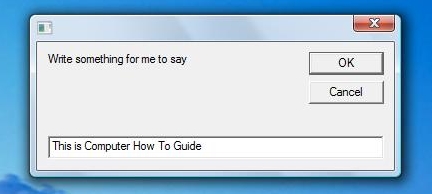
Just enter any text and press Enter. Have fun!
Read also: 10 PC Tips and Tricks (Useful and Fun!)