How to Upgrade Your Laptop for less than $150

Are you on a tight budget but would still want to get an upgrade on your laptop computer? Well, I’m sharing 2 ways here on how to upgrade your laptop computer for less than $150.
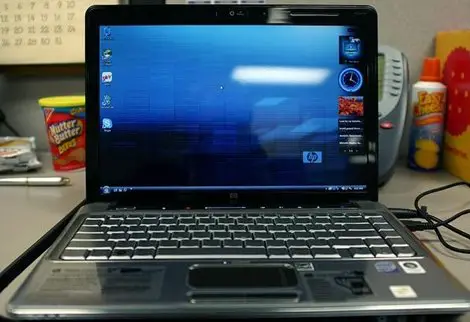
how to upgrade your laptop for less than $150Laptop : Image Credit

Any ideas on how to upgrade your laptop on a tight budget? Please share.

Upgrade The Memory/RAM

Most laptops have 2 RAM slots, and your laptop is most likely has only one of the two slots occupied. That means you can just buy a second RAM and install it in the other slot. Even if both of your slots are occupied, you can still upgrade by replacing both of them with larger RAMs.

Windows XP and 32-bit versions of Vista and Windows 7 can handle 3.5GB of memory at the most. There are also 64-bit versions of Vista and Windows 7 which could handle even more memory. However, you will have to put in the right type of RAM and that’s where you are going to need help. Website like Crucial.com can help to determine the type of RAM that your laptop takes.

[Read also: RRAM! RRAM!!]

You can buy laptop RAMs at online or local stores. A 4GB RAM would cost under $30 while an 8GB RAM under $50.
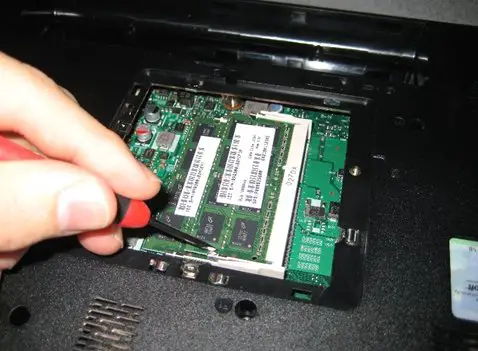
RAM Upgrade
RAM Upgrade : Image Credit

Upgrade The Hard Drive

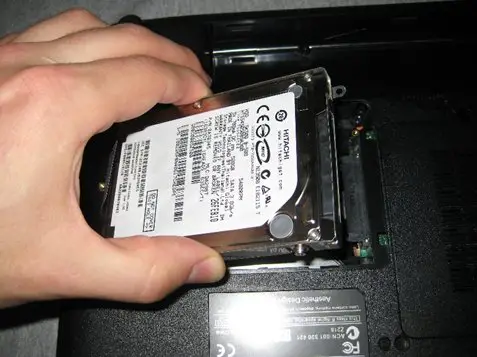
This could be a lot more difficult than you might expect, because all of the files, operating system and software are in the hard drive. You will want to transfer all of them to the new one. First, you need to figure out if your laptop takes an IDE hard drive or if it has a SATA interface.

IDE has 40 individual pins to connect to the laptop whereas SATA has two tabs instead of a bunch of pins. An external hard drive and a program called Clonezilla might be helpful here. Make a Clonezilla Live CD and boot your laptop from it. Using Clonezilla, take an image of your hard drive and store it in the external hard drive. Now swop the old hard drive with the new one.

Finally, back to Clonezilla and restore the image back to the new hard drive. According to your needs, you can buy hard drive of any space size.

You can buy hard drives at Amazon.com and choose from various companies such as Seagate and Western Digital. A 500GB hard drive would cost less than $100.

[Recommended read: 5 Uses for Hard Drives Old and New (That you may not have thought of)]

Hard Disk UpgradeHard Drive Upgrade : Image Credit

This is how you can upgrade your laptop with a tight budget.

[Read also: Tips on How to Improve Laptop Performance]

What’s your way to upgrade your laptop for less than $150? Comment here.

Article by Peter Lee

Peter has written 269 article(s) for ComputerHowToGuide.com.

Peter Lee is the owner and administrator of ComputerHowToGuide.com. A fun loving person, he writes about a variety of topics related to computers and technology.

Like this post? Stay connected with ComputerHowToGuide.com on Facebook | Twitter | Google+

Please Use Any of The Commenting Systems Below to Comment.

Loading Facebook Comments ...

38 Comments

  1. lianemarkus says:

    With this, many will be able to save enough money if they are planning to upgrade their laptop without spending too much money at all. This will really be very helpful and useful to people who are using laptops because they will be able to enjoy and utilize their laptop even if there are so many laptops that are sold in various markets.

  2. Peter says:

    These are just 2 of the many ways to upgrade laptop for cheap, glad that you found it useful to you Liane. Thanks for the comment.

  3. lianemarkus says:

    It really did help me a lot Peter. I will be needing this badly most especially that i used to work on my laptop all the time. And with this, you have provided me with a great tip where I can save money at the same time..

    • Peter Lee says:

      Thanks for the compliment Liane. By the way, this blog is now on WordPress, sorry for the missing links in your comments. Some got lost during the transition and some didn’t. Anyway, comments are now KeyWordLuv and CommentLuv enabled. You can try to comment now using the format – YourName@YourKeywords.

  4. Govind says:

    Nice tips. Upgrading gadgets really helps sometimes and save you lots of money which you would have spent on buying a new one.

  5. Veronica says:

    Personally when it comes to upgrading my laptop, i’d rather go to a specialist than doing it myself. Laptops are delicate and more complex compared to desktops. On the bright side though, learning how to open and upgrade your laptop on your own is cost effective however you need to seek assistance from experts especially if you’re doing it the first time.

    • Peter Lee says:

      Yes I do agree with you. If one is not confident enough to perform the upgrade on their own, it is better to let the expert to do the job. However, from my personal experience, the upgrades mentioned in the article are actually not that complicated at all. Thanks for your opinion Veronica.

  6. Kevin says:

    sure RAM is the cheapest upgrade with noticeable performance. HDD will be next.
    Kevin recently posted..Update Your Keyboard DriverMy Profile

  7. jarod says:

    very informative post! most people only take the time to fix their desktops… its good to know that upgradinging your laptop isnt as hard as one might think! you should write a new article titled “how to upgrade your android tablet” ;)
    jarod recently posted..Junior Tablet | Best Kids Tablet | Tablet for KidsMy Profile

  8. jarod says:

    Peter, I’m sure you’ve noticed the huge surge of tablet related traffic to your site within the last 6 months, the markets are booming for this!
    jarod recently posted..Junior Tablet | Best Kids Tablet | Tablet for KidsMy Profile

  9. Rosel says:

    Great post, very informative and useful way to upgrade laptops without spending much. Thanks for sharing.

  10. Lisa says:

    Thanks for this technical thing about laptops, I use laptops but I was not aware of this technique to upgrade.

  11. Ella says:

    This is how I upgraded my old laptop and it really help even by little :) Nice blog

  12. Paul Smith says:

    I upgraded the memory on my laptop the other day and it really made a difference in performance. Before i would always get the hard drive light flashing constantly and i was told that i will need more memory in my laptop because of this and the person ws right.

    • Peter Lee says:

      I guess that your hard drive light was flashing because it was used as temporary memory at that time when your laptop was running short of memory. Nice to know that it has finally resolved. Thanks for the comment Paul.

      • Paul Smith says:

        No problem. That does make sense though, that my machine ran out of memory thats why it is was trying to use virtual memory from the hard drive. So does this mean that you are always suppose to leave extra space on the hard drive for virtual memory? or it doesn’t matter?

  13. Danny says:

    My laptop has 4gb right now. I thought It would be using just 1 slot but when I opened it I saw 2x 2gb ram. I went to the hp site to check for an upgrade but the biggest ram they sold was 2gb. So I thought that that was just the max at the moment. But now I see that you can get 4gb ram as well. This means I can get double the ram, making this computer a bit faster again. Cuz I like to keep a lot of stuff open at the same time.
    Danny recently posted..Crosman Phantom 1000 FPS .177 Break Barrel Air RifleMy Profile

  14. Karen says:

    So glad I found this article! I would love to get a new laptop, but money’s a bit tight so I have been trying to keep my poor 5 year old Toshiba alive. The battery doesn’t last long if not plugged in though, and it overheats fairly quickly, but the biggest problem is the computer screen has a loose wire or something so it flickers and sometimes completely goes out. Do you have any fairly easy fixes for that? My friend said it could be expensive to fix. I do need to upgrade the memory and hard drive as well, so I will take your advice for that! Thanks again.

  15. Jeff says:

    A few months ago I also upgraded my notebook, at first I have been thinking about buying a new one, but I wanted display resolution 1680×1050 and found that this is a problem (there was not a single one notebook with such resolution). So I bought another memory module and I have to say it helped (2 to 4 GB). Hard drive: I have 100GB currently and after deleting all the unnecessary stuff and moving all archive files to external backup drive – my problem with space disappeared. I thought also about processor upgrade (it’s not that hard, but you will need a screwdriver), but I found that I already have the fastest processor that could fit into my socket. But if you are skilled, I would recommend you to check eBay (or other places) prices if there isn’t a better CPU for cheap.

    • Peter Lee says:

      Looks like you’ve gave your notebook a little make over Jeff? I’ve never purchased any used computer parts from eBay before, yeah I almost forgot eBay…, I think I should check it out!

  16. David says:

    I am glad I found your site. I have been thinking about add more Ram to my laptaop you now I am more motivated than ever. As for upgrading the hard drive that is a bit mor complicated as you state. I expect that I will do the simpler Ram upgrade first.

  17. mazcorn says:

    i think thats useful method for upgrade ram,,. .how about 8Gb ram??they will be accelerated quickly to your favorite game
    mazcorn recently posted..Dell XPS X14Z-6923SLV, 14-Inch Laptop with 2.8 GHz Intel Core i7-2640M and 8-cell lithium-ion Prismatic battery. ReviewsMy Profile

  18. John says:

    Good stuff here. I recently upgraded my laptop with a OCZ Vertex SATA III 120gb hard drive. That was the single best upgrade I have every done. The computers fully boots to a ready state in less than 15 seconds. All my applications also open so quickly. Best part was a I found it for a great deal. It was $79 after mail in rebate, and the rebate was delivered to me in the form of a AMEX gift card in less than 1 week. Sweet!

  19. Jake Ruston says:

    Upgrading your laptop is definitely a lot cheaper than simply buying a new one.

    These tips are great for users of regular laptops, unfortunately for Macbook Pro owners like myself it isn’t quite as easy (but we won’t go into that) :D
    Jake Ruston recently posted..7-ZipMy Profile

  20. Mike says:

    I kinda agree with you Jake. Of course its a lot cheaper than purchasing a new one. Anyways it will be the same I guess, upgraded laptops and brand new models. Bother thinking, I have my tab :D

  21. Mel says:

    I have recently noticed that my laptop has been running slightly slower than normal. It takes a longer time to start up and shut down. How can I increase the performance?

  22. Nwosu Desmond says:

    This is definitely a life saver… i love this piece and most especially your angle on it. Thanks for sharing such an interesting information.

0 Trackbacks

Leave a Reply

Your email address will not be published. Required fields are marked *

You may use these HTML tags and attributes: <a href="" title=""> <abbr title=""> <acronym title=""> <b> <blockquote cite=""> <cite> <code> <del datetime=""> <em> <i> <q cite=""> <strike> <strong>

CommentLuv badge
This blog uses premium CommentLuv which allows you to put your keywords with your name if you have had 3 approved comments. Use your real name and then @ your keywords (maximum of 3)